


Apply for a PAN Card Online
You can apply for a PAN Card online through the Protean (NSDL) portal, the UTIITSL portal, or the Income Tax Department's Instant e-PAN service. Since 1 April 2026, new applications use Form F093 (Indian individuals) or F095 (foreign citizens) instead of the earlier Form 49A/49AA, and Aadhaar alone no longer counts as proof of birth.

Key Highlights -
- For a new PAN Card application, Aadhaar is mandatory as proof of identity and address, and a separate proof of birth document is also required.
- For the Instant e-PAN facility, Aadhaar authentication, OTP verification and a DigiLocker-fetched proof of birth document are required.
- PAN cards can be applied online through the Income Tax Portal, NSDL (Protean), or UTIITSL.
- Corporates are now issued a PAN automatically at the time of their incorporation.
- PAN correction or update requests can be filed online.
PAN or Permanent Account Number is an important document that is required to carry out certain tasks. Given this, it is necessary to have a card that contains a unique 10-digit alphanumeric code, which is issued by the Income Tax Department.
Eligibility Criteria to Apply for PAN Card
- Indian residents who are 18 years of age or older
- Minors applying through their parents or legal guardians
- Hindu Undivided Families (HUFs)
- Partnership firms
- Trust and associations
- Companies and Limited Liability Partnerships (LLPs)
- Foreign citizens and NRIs applying through Form F095
How to Apply for a PAN Card Online?
Applying for a PAN Card online is a very simple process facilitated by the (NSDL) website or the (UTIITSL) website. Both platforms have received explicit authorization from the Government of India to issue PAN Cards and handle necessary changes or corrections on behalf of the Income Tax Department.
How to Apply for a PAN Card Online via the NSDL(Protean) Website?
Follow the steps mentioned below, fill in the necessary details, and upload the required documents on the NSDL (Protean) website.
It is recommended to keep all necessary documents such as Aadhaar, identity proofs, and address proof ready before initiating the application process on the Protean (earlier NSDL) website.
Step1 - Visit the Protean website (formerly NSDL website ) then Click on 'Apply Online' section.
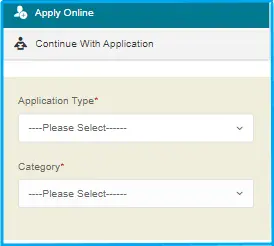
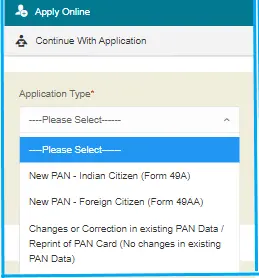
Step 2 - Select your application type: Indian Citizens, Foreign Citizens, or Changes or Correction in PAN/ in existing PAN Data .
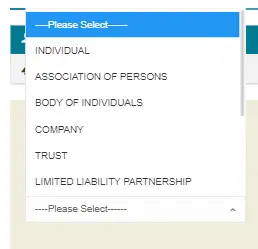
Step 3 - Select your Category. The options are: Individual, Association of Persons, Body of Individuals, Trust, Limited Liability Partnerships, Firm, Government, Hindu Undivided Family, Artificial Judicial Person, and Local Authority.
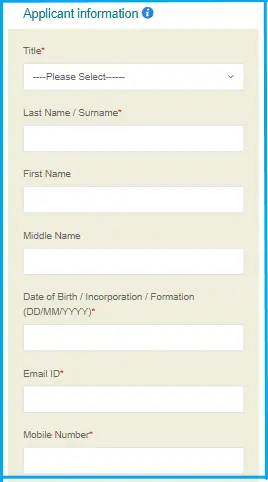
Step 4 - Fill in the Last name/surname, First name, Middle Name, Date of Birth/Incorporation/Formation in DD/MM/YYYY format, email ID, mobile number, and Captcha code. Submit the form.
Step 5 - On the next page, you will receive an acknowledgement with a token number on your email ID. This token number can be used to save your progress and continue the application later if it is not completed in one go. Click on 'Continue with PAN Application Form' on this page.
Step 6 - You will be redirected to the next page where you have to submit your digital-KYC. Applicants can opt for Aadhaar-based e-KYC to complete the process without submitting physical documents.
Step 7 - Select how you want to submit the documents. You can: a) Forward application documents physically; b) Submit digitally through digital signature; c) Submit digitally through e-sign. The e-sign option allows for a completely paperless process using Aadhaar OTP authentication.
Step 8 - On the same page, indicate what documents you are submitting as proof of identity, address, and date of birth. Confirm the declaration, place and date of application. Review and submit the form. Make sure you make no mistakes.
Step 9 - Click on 'Proceed' and you will be taken to the payment options. You can use debit/credit card, net banking or demand draft
Step 10 - You will receive an acknowledgment receipt and payment receipt. Print the acknowledgment receipt. You can check your PAN Card application status using this receipt. The application is processed after successful verification of details and documents submitted.
NOTE: Do not staple or clip the photos. Ensure that you sign across the photo that you attach on the left side of the receipt. Do not sign the photo on the right. Ensure that your signature is within the box provided. If you use your left thumb impression, ensure that it is attested by a gazetted officer or a notary. If you choose the physical submission process, then the printed acknowledgement along with documents must be sent to the designated Protean office within the prescribed time.
How to Apply for a PAN Card Online via UTIITSL Website?
The steps to apply PAN Card online on the UTIITSL website are as follows:
Step 1 - Visit the official website of UTIITSL.
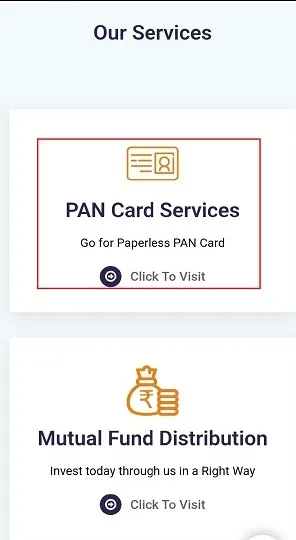
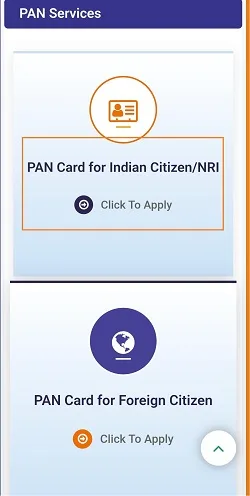
Step 2 - Click on the PAN Card for Indian citizen/NRI. You can also choose the 'PAN card for foreign citizens' option if applicable.
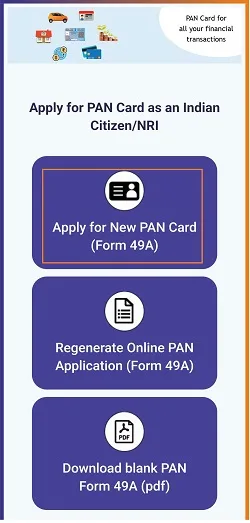
Step 3 - Select 'Apply for new PAN Card'. Indian citizens and entities use Form F093 (individual) or F094 (non-individual), while foreign citizens and entities use Form F095 (individual) or F096 (non-individual).
Step 4 - In the new PAN application form you have two options: Digital mode and physical mode. You are also required to select the applicant status and PAN card mode before proceeding further.
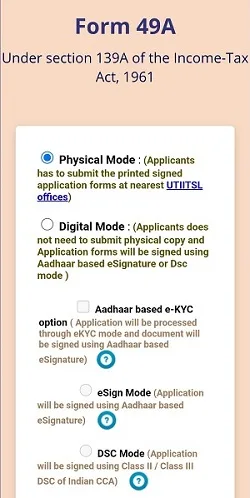
Step 5- After selecting the Digital Mode, fill out all the information, such as personal details, contact details and documents. You will also need to enter additional details such as parent information, address details, and upload the required supporting documents.
Step 6 - Pay the required fee using debit/credit card, net banking or via a demand draft.
Step 7 - An acknowledgement slip will be displayed on the screen and send to your registered email Id. A reference number is also generated after initial submission, which can be used to track or continue the application.
Important Note : If you select the Physical Mode option, just print the PAN Card form, attach your photo, signature, and required documents, and send them to the UTIITSL office.
PAN PDC Incharge - Mumbai region,
UTI Infrastructure Technology And Services Limited,
Plot No. 3, Sector 11, CBD Belapur,
Navi Mumbai - 400614
- PAN PDC In charge (Kolkata region): UTI Infrastructure and Services Limited,
29, N.S. Road, ground floor, opposite Gilander House and Standard Chartered Bank, Kolkata – 700001
- PAN PDC In charge (New Delhi region): UTI Infrastructure and Services Limited,
1/28 Sunlight Building, Asaf Ali Road, New Delhi – 110002
- PAN PDC In charge (Chennai region): UTI Infrastructure and Services Limited,
D-1, First floor, Thiru-Vi-Ka Industrial Estate, Guindy, Chennai - 600032
How to Apply for an instant e-PAN Through Income-Tax Portal
Step1- Visit the Income Tax website and choose the option 'Instant e-PAN.'
Step 2 - Choose the option “Get a new e-PAN.”
Step 3 - Provide your Aadhaar number in the required field and click on “Continue”.
Step 4 - An OTP verification screen will appear. Accept the terms and conditions by ticking the checkbox and proceed.
Step 5 - Enter the OTP sent to your mobile number registered with Aadhaar. After selecting the checkbox, proceed by clicking “Continue”.
Step 6 - You will then be redirected to DigiLocker, where you select and share a proof of birth document, such as your birth certificate, Class 10 marksheet, or driving licence, and give consent by clicking 'Allow'.
Step 7 - Your basic details, including your name and date of birth as per the documents submitted, will be displayed. Verify all the details, complete email validation if prompted, accept the declaration, and click 'Continue'.
After successful submission of application form, an acknowledgement number will be generated and sent to your registered mobile number. Once the e-PAN is allotted, you will receive a confirmation message. In most cases, the e-PAN is issued within a few minutes, and you can download it directly from the portal.
Note: You can obtain a physical copy of your PAN card by placing a reprint request and paying the applicable charges.
The Instant e-PAN facility is available to individual Indian citizens who do not already have a PAN, have a valid Aadhaar linked to an active mobile number, and have access to DigiLocker to submit proof of birth. Minors and entities such as NRIs, HUFs, firms, companies, and trusts are not eligible to use this service.
Fees to Apply for a PAN Card Online
Apart from applying for a PAN Card, you can also make corrections, changes, or request a PAN Card reprint online. You can visit the official website of UTIITSL or Protean e-Gov Technologies Limited (formerly NSDL).
The PAN application fee depends on whether you choose physical document submission or a paperless (digital) mode, and whether a physical PAN card in required.
The fee for PAN application through physical mode of document submission is Rs.107. Application submitted online through paperless mode costs Rs.101.
If you opt for only an e-PAN (without a physical card), the fee is lower which is Rs.72 for physical submission mode and Rs.66 for paperless mode.
For applicants with a foreign communication address, the fee is higher that is Rs.1,017 for physical mode and Rs.1,011 for paperless mode.
In case of PAN card reprint without any changes, the fee is Rs.50 for dispatch within India and Rs.959 for dispatch outside India.
It is also important to note that instant e-PAN obtained through the Income Tax e-filing portal using Aadhaar is free of cost.
Documents Required to Apply for a PAN Card
Proof of Date of Birth
One of the below-mentioned documents may be submitted as proof of date of birth:
- An affidavit sworn before a magistrate stating the date of birth.
- The marriage certificate that has been issued by the Registrar of Marriages.
- Pension payment order.
- Any photo identity card that has been issued by the State Government or Central Government.
- Bank certificate with an attested photograph of the applicant with the account number.
- Any photo identity card that has been issued by a State Public Sector Undertaking or Central Public Sector Undertaking.
- Birth certificate that has been issued by the municipal authority.
- Mark sheet or Matriculation certificate that has been provided by a recognized board.
- Passport.
- Driving License.
- Elector’s photo identity card.
- Domicile certificate issued by the State Government.
- Central Government Health Service Scheme (CGHS) or Ex-Servicemen Contributory Health Scheme (ECHS) photo card.
Proof of Address
Photo copy of any one of these documents | Elector’s photo identity card, Aadhaar card, Passport, Driving licence |
Photo copy of these documents (not over three months) | Landline bill, Electricity bill, Gas connection card, Water bill, Depository account statement |
Original documents | Certificate of address |
Proof of Identity
Photo copy of any one document | Aadhaar card, Passport, Voter Id, Driving licence, Ration card |
Originals | Certificate of identity |
Read More About
- How to apply Instant e PAN Card Through Aadhaar
- PAN 2.0 - Features, Benefits, and Updates
- Download E-PAN Card Online
- How to Link PAN Card with Aadhaar Card?
- Duplicate PAN Card
- How to Link PAN Card with Bank Account
- How to Activate a Deactivated PAN Card After Missing Deadline
- PAN Card Application Status through NSDL& UTIITSL
- Simple Process to an Download E-PAN Card Online
- Apply for child PAN Card
- What is the Penalty for Multiple PANs
- PAN Card for HRA ExemptionPan for HRA Exemption
- How to Change Photo and Signature on your PAN Card
- How to Activate a Deactivated PAN Card?
FAQs on How to Apply for PAN Card Online
1.What is a PAN Card and why do I need one?
A PAN (Permanent Account Number) Card is a 10-digit alphanumeric identity document issued by the Income Tax Department that is required for filing income tax returns, opening bank accounts and completing many other financial transactions in India.
2.Who is eligible to apply for a PAN Card online?
Indian residents aged 18 or above, minors through a parent or guardian, HUFs, partnership firms, trusts, companies, LLPs and foreign citizens or NRIs can all apply for a PAN Card online, each using the application category that matches their status.
3.How can I apply for a PAN Card online?
You can apply for a PAN Card online through the Protean (formerly NSDL) portal, the UTIITSL portal, or the Income Tax Department's Instant e-PAN service, choosing whichever channel suits your applicant category and preferred document submission mode.
4.What documents do I need to apply for a PAN Card online?
To apply for a PAN Card online, you generally need proof of identity, proof of address and proof of date of birth from the lists of documents accepted by the Income Tax Department, as set out in the Documents Required section above.
5.Which PAN application form should I use?
The form you use depends on your applicant category: Indian individuals, Indian entities, foreign individuals and foreign entities each have their own current PAN application form, so select the form that matches your category when applying online.
6.Can I apply for a PAN Card offline?
Yes, you can apply for a PAN Card offline by obtaining the current application form from a Protean TIN-Facilitation Centre or a UTIITSL PAN centre, filling it in, and submitting it with the required documents and fee at the centre.
7.Is Aadhaar enough on its own to apply for a PAN Card?
No, Aadhaar alone is not enough. It serves as proof of identity and address, but a separate proof of date of birth document is also required as part of the current PAN Card application process.
8. Can I download my PAN Card online?
Yes, once your PAN Card application is processed, you can download your e-PAN Card online from the Income Tax e-filing portal, the Protean website, or the UTIITSL website.
9. Is an e-PAN Card valid?
Yes, an e-PAN Card is a valid electronic form of the PAN Card and can be used wherever a physical PAN Card is required, subject to the terms of the service you used to obtain it.
10.How long does it take to get a PAN Card after applying online?
An Instant e-PAN is usually issued within minutes of a successful Aadhaar-based application, while a regular PAN Card application takes a few working days to process once your documents are verified.
11.Can I have more than one PAN Card?
No, holding more than one PAN Card is against the law. If you have been issued more than one PAN Card, you should surrender the extra PAN Card to the Income Tax Department.
12.Can I apply for a PAN Card online using my mobile phone?
Yes, you can apply for a PAN Card online using your mobile phone, as the Protean, UTIITSL and Income Tax e-filing portals are all accessible through a mobile browser.
News about Apply for a PAN Card Online
New PAN Card Application Rules from 1 April 2025
The government has introduced new PAN card application rules which will be effective from 1 April 2026. Under the revised guidelines, Aadhaar will no longer be accepted as the only document for applying for a PAN. Applicants will now need to provide additional documents such as a birth certificate, voter ID, passport, driving licence, affidavit, or Class 10 certificate. However, applications with only Aadhaar card as proof will still be allowed until 31 March 2026.
The government also plans to replace existing PAN application forms with newly introduced forms. As per the new rule, if the name on a PAN card does not match the name on the Aadhaar card, the PAN may be deactivated.

Disclaimer
Credit Card:
Credit Score:
Personal Loan:
Home Loan:
Fixed Deposit:


Copyright © 2026 BankBazaar.com.